

Reference
CharterPlanningChecklist

Overview
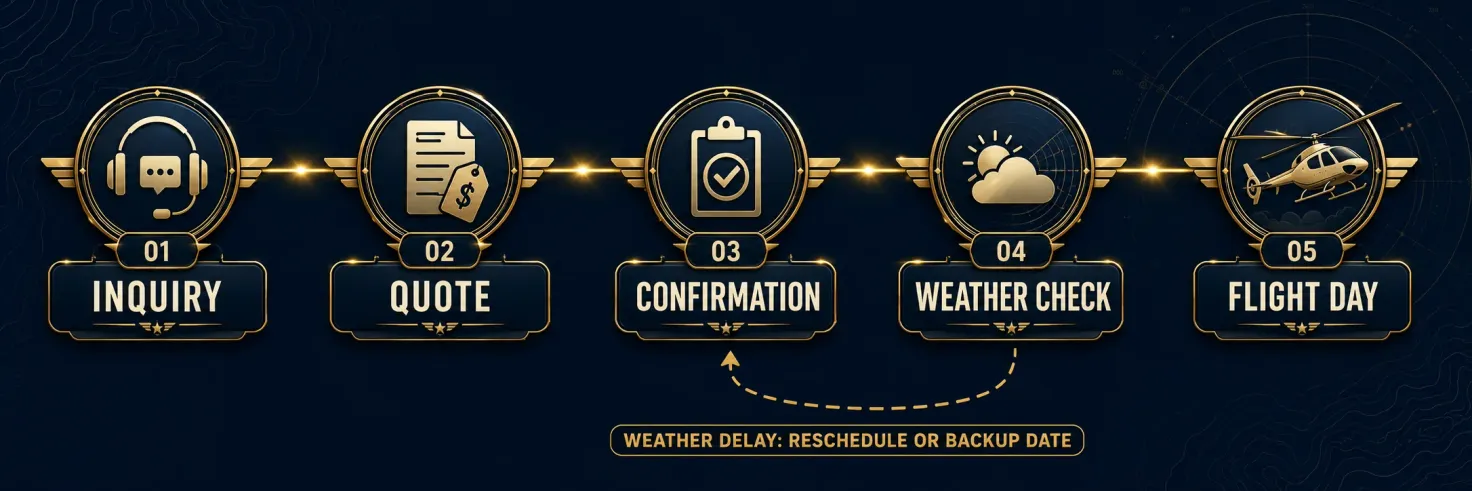
Booking a helicopter charter is simpler than most first-timers expect, but it rewards doing things in the right order. What follows is the whole arc in six stages, from first inquiry to flight day, with the decision points and lead-time notes that belong at each one. Where a subject has real depth of its own, such as cost, regulation, weather, or landing sites, there is a link to the reference that covers it properly.
The sequence below reflects typical on-demand charter practice in the US. Individual operators vary in the details, so treat this as the general shape, not a universal script.
This page is also a working tool. Every item has a checkbox, the page remembers what you have ticked, and the whole list prints or saves as a PDF with your ticks intact.
How to Use This Checklist
Every item in the six stages below has a checkbox. Tick items as you settle them and the counter above the list keeps score, so you can see at a glance how much of the plan is still open. A few habits make the tool worth more than a list you read once.
- Work the stages in order. Each stage rests on the one before it. An operator cannot match an aircraft to a mission you have not defined, and cannot confirm a quote for a passenger list that is still moving. Start at Stage 1 even if a later stage is the one you think you need.
- Tick an item only when it is settled. Settled means you have the answer in a form you could read out to an operator over the phone. A rough idea is not a tick.
- Your ticks are remembered in this browser. Progress is saved on this device, so you can close the tab, lose the connection, or come back next week and pick up where you left off. Nothing is sent anywhere. The record stays on your own computer or phone, which also means it will not follow you to a different device or a private window.
- Print it, or save it as a PDF. The Print / Save as PDF button produces a clean black-on-white copy of the list with your ticks intact, a header showing where it came from, and write-in lines for the trip, the person preparing it, and the date. In the print dialog, pick a printer for paper or Save as PDF for a file you can send to whoever is helping you plan.
- Reset clears every tick. Use it when you start planning a different trip. There is no undo, so print or save first if you want a record of the last one.
- Read the note under each item. It explains what goes wrong when that item is missing. If you are not sure whether something matters for your trip, the note is the test.
The Six Stages, in Order
01Define the mission
02Passengers and luggage
03Dates and weather flexibility
04Vet the operator
05Pre-flight-day confirmations
06Day-of logistics
Common Questions
How far ahead should I start?
Earlier is always easier, but a simple transfer on an ordinary week can often come together on short notice, while events, peak seasons, and multi-stop itineraries want more lead time. The controlling factor is rarely the paperwork; it is aircraft and crew availability.
What happens if weather cancels the flight?
The operator works with you on rescheduling or moving to your backup date, which is why Stage 3 exists. The mechanics of weather delays and rebooking are covered in the Weather, Delays & Scheduling FAQ.
Do I need to know which helicopter I want before I call?
No. Describe the mission, the passengers, and the luggage, and the operator matches the aircraft. The Helicopter Class Comparison Guide gives you the vocabulary if you want it.
Will the checklist remember what I ticked?
Yes, on the device and browser you used. Progress is stored locally by your browser rather than on this site, which is why it survives a dropped connection or a closed tab, and also why it will not appear on a second device. Clearing your browser data, or using a private window, clears it too.
Can I print the checklist or save it as a PDF?
Yes. The Print / Save as PDF button at the top of the list opens your browser’s print dialog with a clean, black-on-white copy of the checklist, ticks included. Choose a printer for a paper copy, or Save as PDF for a file.
What will it cost?
That depends on the mission, the aircraft, and the market, and it deserves its own reference: see What a Charter Costs: Framework, Not Quotes. At checklist level, the only cost item that matters is confirming the quote in writing before flight day.